> ## Documentation Index
> Fetch the complete documentation index at: https://docs.dubot.ai/llms.txt
> Use this file to discover all available pages before exploring further.
# Add knowledge to your workspace
> Crawl a public Help Center or upload documents, then review and scope the corpus
## What you will do
You will add a public Help Center or supported documents to the workspace corpus, check source
health, and review extracted articles before making knowledge available to an experience.
## Add a source
In the Dubot dashboard, open **Knowledge**, select **Add source**, and choose **Crawl a URL** or
**Upload documents**.
Enter the full start URL. Choose **This page only** or **Index pages under**, then confirm the
same-origin path Dubot should include. The crawler respects `robots.txt`; allowlist
`dubot-crawler` if the source blocks it. When you need only part of a documentation site,
prefer the narrowest stable section root, such as `/guides`, `/sdk`, or `/reference`, instead
of the site root.
Upload PDF, DOCX, Markdown, or TXT files, up to 20 MB each. Review ownership and sensitivity
before adding them to a workspace corpus.
## Check health and sync
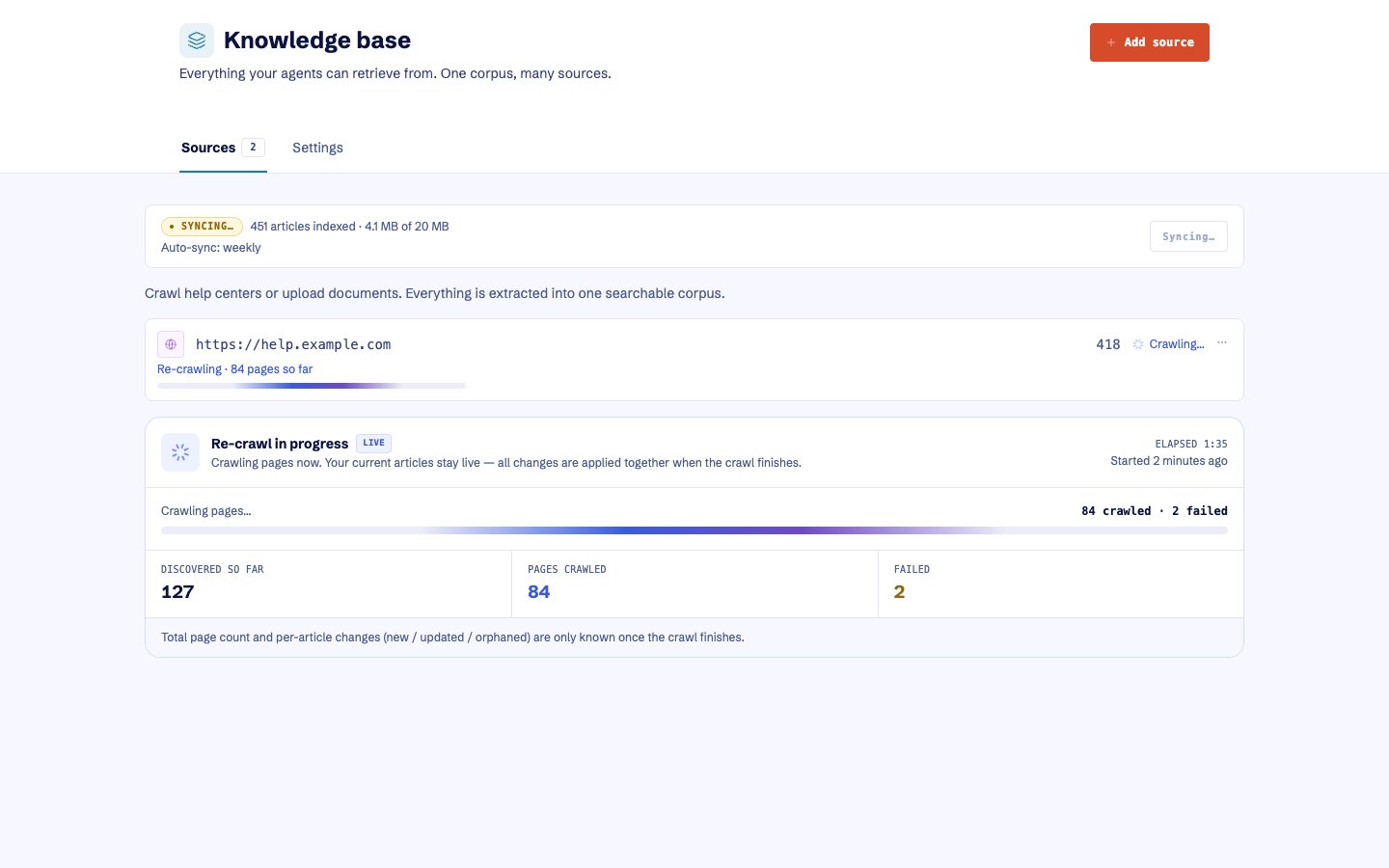
Review the source status, article count, corpus size, extraction failures, and the latest sync.
You can re-crawl one web source or sync all crawl sources. Optional weekly synchronization is
available for web sources. The existing corpus remains available during a re-crawl. Compare the
article count with the pages you intended to index. A **Healthy** source can still be incomplete.
 ## Inspect articles
Open extracted articles to confirm titles, links, content, and the source they came from. Look for
content that is no longer found at its source. Treat those entries as potential orphans. Re-crawl
when Dubot could not verify the missing pages, and remove only verified orphaned articles. Delete a
source only when you intend to remove every article extracted from it.
## Resolve ingestion problems
| Problem | What to do |
| ------------------------------------------------------ | ------------------------------------------------------------------------------------------------------------------------------------------------------------------------------------------ |
| A crawl is Failed | Open the source for its failure detail, confirm the page is public and allowed by `robots.txt`, then re-crawl |
| A site root fails or discovers no useful articles | Add the relevant public section root, choose **Index pages under**, and verify its article count before removing failed or overlapping sources |
| A Healthy source contains fewer articles than expected | Open **View articles** and compare its URLs with the public navigation or sitemap. Add a skipped page with **This page only**, then verify the replacement before deleting an empty source |
| A PDF has no text layer | Convert the scan with OCR to a searchable PDF, or export its content as text before uploading |
| A file exceeds 20 MB | Split it into smaller owned sources |
| Extracted text exceeds 4 MB for one article | Split the document by topic before uploading |
| The workspace corpus would exceed 20 MB | Remove verified obsolete material or split the intended corpus across an agreed workspace strategy |
Re-crawling preserves the existing corpus until Dubot accepts the replacement. Do not delete a
healthy source merely to retry a failed refresh. After a documentation release, re-crawl the
affected section or select **Sync all**, then spot-check the article count, titles, and links.
## Scope the knowledge
### When article changes become available
Knowledge articles have no separate **Publish** action. Accepted crawls and uploads, and article
or source removals, automatically update the corpus delivered to the runtime. Existing published
experiences can use those changes without being republished when their knowledge scope already
includes the affected content. Review a source before adding it to a workspace used in Production.
Source health describes ingestion, not successful delivery or retrieval. After a sync, confirm
the intended article appears in a real Search or Ask result. If the source is Healthy but runtime
results remain stale, re-crawl the source or use **Sync all**, then collect the source URL, sync
time, expected article, and observed result for support.
### Choose what each experience can retrieve
When configuring a Wizard, Guidance, a Product domain capability, or the Resource Center Agent,
choose the entire knowledge base or selected articles. A Wizard, Guidance, or the Resource Center
Agent can also leave direct knowledge unattached. Ingestion and retrieval access are separate
decisions. A Resource Center static card is not knowledge grounding, and Resource Center Search
uses the delivered workspace corpus. Save and test changes to an experience's knowledge scope,
then publish that experience or capability to update its Production scope.
Authenticated crawling of private sources is not part of the current contract. Validate source
ownership, exclusions, freshness, and the target experience's scope before publishing.
## Expected result
The source reports a healthy sync, its intended articles are visible and readable, and each
experience uses an explicit scope. A source existing in Knowledge does not make it available to
every customer surface automatically.
Next, configure the [Resource Center](/guides/configure-resource-center), a
[Wizard](/guides/build-and-publish-wizard), or [Guidance](/guides/enable-guidance). For safe source
removal, follow [Recover or roll back configuration](/operate/recovery#knowledge-removal).
## Inspect articles
Open extracted articles to confirm titles, links, content, and the source they came from. Look for
content that is no longer found at its source. Treat those entries as potential orphans. Re-crawl
when Dubot could not verify the missing pages, and remove only verified orphaned articles. Delete a
source only when you intend to remove every article extracted from it.
## Resolve ingestion problems
| Problem | What to do |
| ------------------------------------------------------ | ------------------------------------------------------------------------------------------------------------------------------------------------------------------------------------------ |
| A crawl is Failed | Open the source for its failure detail, confirm the page is public and allowed by `robots.txt`, then re-crawl |
| A site root fails or discovers no useful articles | Add the relevant public section root, choose **Index pages under**, and verify its article count before removing failed or overlapping sources |
| A Healthy source contains fewer articles than expected | Open **View articles** and compare its URLs with the public navigation or sitemap. Add a skipped page with **This page only**, then verify the replacement before deleting an empty source |
| A PDF has no text layer | Convert the scan with OCR to a searchable PDF, or export its content as text before uploading |
| A file exceeds 20 MB | Split it into smaller owned sources |
| Extracted text exceeds 4 MB for one article | Split the document by topic before uploading |
| The workspace corpus would exceed 20 MB | Remove verified obsolete material or split the intended corpus across an agreed workspace strategy |
Re-crawling preserves the existing corpus until Dubot accepts the replacement. Do not delete a
healthy source merely to retry a failed refresh. After a documentation release, re-crawl the
affected section or select **Sync all**, then spot-check the article count, titles, and links.
## Scope the knowledge
### When article changes become available
Knowledge articles have no separate **Publish** action. Accepted crawls and uploads, and article
or source removals, automatically update the corpus delivered to the runtime. Existing published
experiences can use those changes without being republished when their knowledge scope already
includes the affected content. Review a source before adding it to a workspace used in Production.
Source health describes ingestion, not successful delivery or retrieval. After a sync, confirm
the intended article appears in a real Search or Ask result. If the source is Healthy but runtime
results remain stale, re-crawl the source or use **Sync all**, then collect the source URL, sync
time, expected article, and observed result for support.
### Choose what each experience can retrieve
When configuring a Wizard, Guidance, a Product domain capability, or the Resource Center Agent,
choose the entire knowledge base or selected articles. A Wizard, Guidance, or the Resource Center
Agent can also leave direct knowledge unattached. Ingestion and retrieval access are separate
decisions. A Resource Center static card is not knowledge grounding, and Resource Center Search
uses the delivered workspace corpus. Save and test changes to an experience's knowledge scope,
then publish that experience or capability to update its Production scope.
Authenticated crawling of private sources is not part of the current contract. Validate source
ownership, exclusions, freshness, and the target experience's scope before publishing.
## Expected result
The source reports a healthy sync, its intended articles are visible and readable, and each
experience uses an explicit scope. A source existing in Knowledge does not make it available to
every customer surface automatically.
Next, configure the [Resource Center](/guides/configure-resource-center), a
[Wizard](/guides/build-and-publish-wizard), or [Guidance](/guides/enable-guidance). For safe source
removal, follow [Recover or roll back configuration](/operate/recovery#knowledge-removal).