> ## Documentation Index
> Fetch the complete documentation index at: https://docs.dubot.ai/llms.txt
> Use this file to discover all available pages before exploring further.
# Enable Guidance
> Configure and publish Guidance for a workspace
Requires workspace enablement
Guidance has one workspace-level configuration. Publishing that configuration turns Guidance on
for the workspace. Reviewed guides keep their own draft and publish lifecycle.
If Guidance does not appear in the workspace navigation, it is not available for that
organization yet. Contact Dubot before planning an implementation around it.
## Before you start
* Install the Dubot browser SDK on the pages where Guidance will run.
* Make sure the SDK supplies the current user and page context.
* Add workspace knowledge if the planner should ground steps in product documentation.
* Choose a safe Test journey with an explicit stopping point.
## Configure the workspace
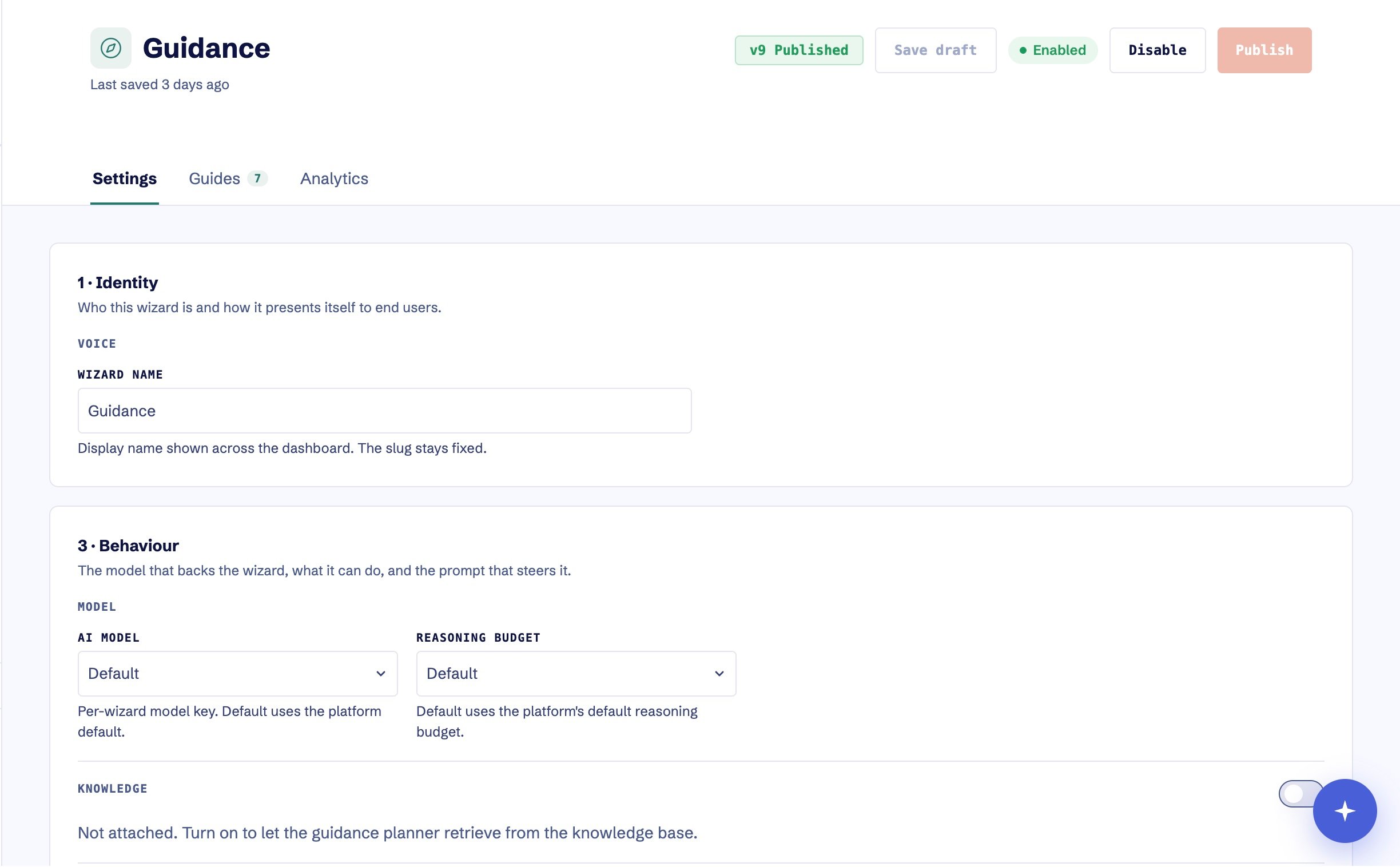 Select **Guidance**, then open **Settings**. The status beside the page actions shows
whether Guidance is currently Enabled or Disabled.
In **Knowledge**, turn on **Attach knowledge base**. Use the entire knowledge base or limit
retrieval to selected articles. Guidance can be published without knowledge, but its plans
will not be grounded in your product documentation.
Use **Contextual booster** for standing product instructions: tone, pacing, handoff copy,
actions the customer must complete, and conditions that should stop the walkthrough. Keep
these instructions true across guides and pages. Distinguish broad orientation requests from
task-specific work so a request for a product tour does not collapse into one navigation step.
Select **Save draft**. Saving changes Test only. If Guidance is already enabled, Production
continues to use the last published version until you publish again.
Start a reviewed guide or a tightly constrained goal in the Test installation. Check target
selection, navigation, customer-owned steps, stop behavior, and the final outcome.
When Guidance is disabled, select **Enable & publish** and confirm the version. When it is
already enabled, select **Publish** to replace the Production configuration.
Start the same safe journey against the Production installation. Confirm that the published
guide and its Guidance dependency both work before linking the guide from the Resource Center.
## Prompt for tours and focused tasks
A useful workspace prompt treats orientation and task completion differently:
```text theme={null}
For a product tour or “show me around” request, introduce three to six meaningful destinations,
explain what each is for, and let the person choose where to continue. For a task-specific request,
stay focused on that job and give one visible instruction at a time.
```
Keep the production boundary explicit. Guidance may help an administrator prepare and save a
draft, but it should stop before publishing, enabling, disabling, archiving, deleting, changing
permissions, or handling credentials unless that action is intentionally supported and reviewed.
## What the workspace setting controls
Enabling Guidance publishes the configuration used by the Guidance runtime. It allows the SDK to
start goal-based Guidance and reviewed guides for the workspace. It does not publish every
reviewed guide automatically.
If a Resource Center card launches a guide, the card is ready only when the Resource Center, the
guide, and Guidance are all published for the same environment.
## Update or disable Guidance
Save and test configuration changes before publishing them. To turn Guidance off, select
**Disable**. Disabling removes the published Guidance configuration and stops new walkthroughs;
saved guide drafts and versions remain available for later review.
## Expected result
The representative Test journey selects the intended targets, pauses for customer-owned work, and
reaches its stopping point. After publishing, the same safe Production journey creates a Guidance
run that can be inspected by outcome and timeline.
See [Guidance](/product/guidance) for runtime behavior and
[Preview and publish safely](/operate/publishing) for the broader publishing model. After
collecting a representative run, follow
[Turn a Guidance run into a guide](/guides/review-guidance-run). If Guidance fails to start or
uses stale configuration, follow
[Troubleshoot the browser SDK](/sdk/troubleshooting#resource-center-or-guidance-is-incomplete).
Select **Guidance**, then open **Settings**. The status beside the page actions shows
whether Guidance is currently Enabled or Disabled.
In **Knowledge**, turn on **Attach knowledge base**. Use the entire knowledge base or limit
retrieval to selected articles. Guidance can be published without knowledge, but its plans
will not be grounded in your product documentation.
Use **Contextual booster** for standing product instructions: tone, pacing, handoff copy,
actions the customer must complete, and conditions that should stop the walkthrough. Keep
these instructions true across guides and pages. Distinguish broad orientation requests from
task-specific work so a request for a product tour does not collapse into one navigation step.
Select **Save draft**. Saving changes Test only. If Guidance is already enabled, Production
continues to use the last published version until you publish again.
Start a reviewed guide or a tightly constrained goal in the Test installation. Check target
selection, navigation, customer-owned steps, stop behavior, and the final outcome.
When Guidance is disabled, select **Enable & publish** and confirm the version. When it is
already enabled, select **Publish** to replace the Production configuration.
Start the same safe journey against the Production installation. Confirm that the published
guide and its Guidance dependency both work before linking the guide from the Resource Center.
## Prompt for tours and focused tasks
A useful workspace prompt treats orientation and task completion differently:
```text theme={null}
For a product tour or “show me around” request, introduce three to six meaningful destinations,
explain what each is for, and let the person choose where to continue. For a task-specific request,
stay focused on that job and give one visible instruction at a time.
```
Keep the production boundary explicit. Guidance may help an administrator prepare and save a
draft, but it should stop before publishing, enabling, disabling, archiving, deleting, changing
permissions, or handling credentials unless that action is intentionally supported and reviewed.
## What the workspace setting controls
Enabling Guidance publishes the configuration used by the Guidance runtime. It allows the SDK to
start goal-based Guidance and reviewed guides for the workspace. It does not publish every
reviewed guide automatically.
If a Resource Center card launches a guide, the card is ready only when the Resource Center, the
guide, and Guidance are all published for the same environment.
## Update or disable Guidance
Save and test configuration changes before publishing them. To turn Guidance off, select
**Disable**. Disabling removes the published Guidance configuration and stops new walkthroughs;
saved guide drafts and versions remain available for later review.
## Expected result
The representative Test journey selects the intended targets, pauses for customer-owned work, and
reaches its stopping point. After publishing, the same safe Production journey creates a Guidance
run that can be inspected by outcome and timeline.
See [Guidance](/product/guidance) for runtime behavior and
[Preview and publish safely](/operate/publishing) for the broader publishing model. After
collecting a representative run, follow
[Turn a Guidance run into a guide](/guides/review-guidance-run). If Guidance fails to start or
uses stale configuration, follow
[Troubleshoot the browser SDK](/sdk/troubleshooting#resource-center-or-guidance-is-incomplete).