> ## Documentation Index
> Fetch the complete documentation index at: https://docs.dubot.ai/llms.txt
> Use this file to discover all available pages before exploring further.
# Wizards
> Configure a customer-facing assistant and place it in your product
Wizards and all four placement modes are implemented in the current product build. A wizard
must be published before Production can resolve it.
## One assistant, one placement
A wizard combines customer-facing copy, instructions, capabilities, knowledge scope, model
settings, and one placement. Duplicate the wizard when the same behavior needs a different
placement or targeting rule.
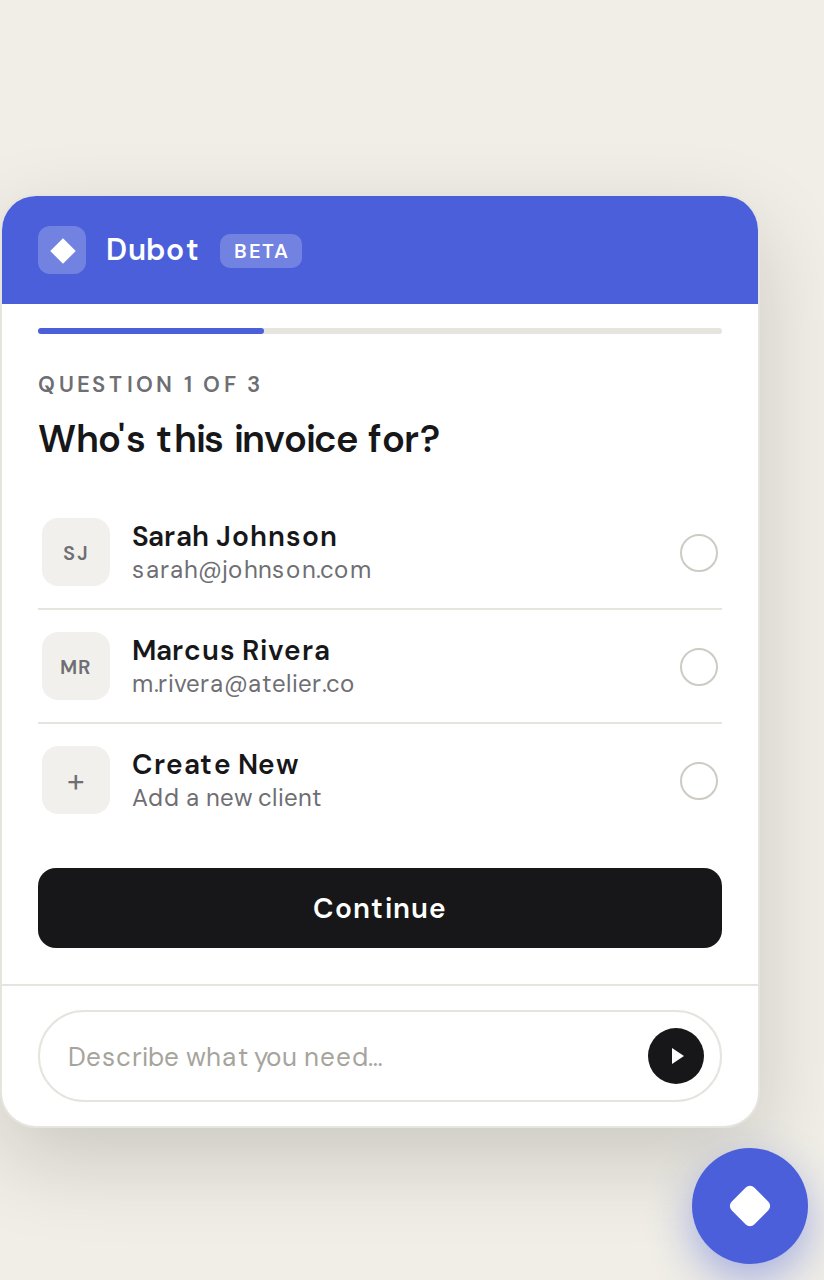 This demonstrates the implemented bubble and conversation states. Published copy, colors,
capabilities, and page context determine the customer experience.
## Configure the behavior
The wizard editor covers:
* a required contextual instruction for the assistant;
* model and reasoning settings;
* a goal description and optional opening message;
* launcher label, input placeholder, and quick prompts;
* file-upload availability;
* attached capabilities;
* direct knowledge scope;
* one placement and its page rules.
Capabilities are reusable. Put cross-wizard security, brand voice, product-domain context, or
skills there rather than copying the same instruction into every wizard.
## Choose a placement
| Mode | Best for | Mount behavior |
| ---------- | ---------------------------------------------- | ------------------------------------------------------- |
| Bubble | Persistent help in a corner of the product | Dubot renders the launcher and panel |
| Inline | Help embedded in an existing page or container | Requires a CSS selector that resolves to a host element |
| Sidebar | A product-level assistant beside the page | Dubot mounts a side panel |
| Fullscreen | Focused, multi-step conversations | Dubot opens a modal-style surface |
Page rules can include or exclude exact paths or path prefixes. Placement matching runs against
the current page, including client-side navigation.
## Make tools available
A wizard can use actions only through its attached Skill capabilities. At runtime, Dubot narrows
that published list again:
* Session API actions must be published and enabled.
* Client-side callbacks must also be registered by the host application for the current page.
* Confirm-gated actions pause before execution.
* Unpublished references are omitted from the Production runtime.
## Test and publish
The latest saved version is available to Test.
Review capabilities, actions, knowledge, placement targeting, and brand settings.
Exercise expected requests, unavailable tools, confirmation, errors, and completion.
Publishing makes the selected version eligible for Production. Saving alone does not.
Review conversations and related Guidance or action outcomes before widening exposure.
Follow [Build and publish a Wizard](/guides/build-and-publish-wizard) for the dashboard workflow.
See [SDK surfaces](/sdk/surfaces) for programmatic rendering and [Publishing](/operate/publishing)
for the lifecycle rules.
This demonstrates the implemented bubble and conversation states. Published copy, colors,
capabilities, and page context determine the customer experience.
## Configure the behavior
The wizard editor covers:
* a required contextual instruction for the assistant;
* model and reasoning settings;
* a goal description and optional opening message;
* launcher label, input placeholder, and quick prompts;
* file-upload availability;
* attached capabilities;
* direct knowledge scope;
* one placement and its page rules.
Capabilities are reusable. Put cross-wizard security, brand voice, product-domain context, or
skills there rather than copying the same instruction into every wizard.
## Choose a placement
| Mode | Best for | Mount behavior |
| ---------- | ---------------------------------------------- | ------------------------------------------------------- |
| Bubble | Persistent help in a corner of the product | Dubot renders the launcher and panel |
| Inline | Help embedded in an existing page or container | Requires a CSS selector that resolves to a host element |
| Sidebar | A product-level assistant beside the page | Dubot mounts a side panel |
| Fullscreen | Focused, multi-step conversations | Dubot opens a modal-style surface |
Page rules can include or exclude exact paths or path prefixes. Placement matching runs against
the current page, including client-side navigation.
## Make tools available
A wizard can use actions only through its attached Skill capabilities. At runtime, Dubot narrows
that published list again:
* Session API actions must be published and enabled.
* Client-side callbacks must also be registered by the host application for the current page.
* Confirm-gated actions pause before execution.
* Unpublished references are omitted from the Production runtime.
## Test and publish
The latest saved version is available to Test.
Review capabilities, actions, knowledge, placement targeting, and brand settings.
Exercise expected requests, unavailable tools, confirmation, errors, and completion.
Publishing makes the selected version eligible for Production. Saving alone does not.
Review conversations and related Guidance or action outcomes before widening exposure.
Follow [Build and publish a Wizard](/guides/build-and-publish-wizard) for the dashboard workflow.
See [SDK surfaces](/sdk/surfaces) for programmatic rendering and [Publishing](/operate/publishing)
for the lifecycle rules.